PluginsThemesLanguage Packs

WebBlocks Redirect Manager

Manage redirects for WebBlocks CMS.

Free · Version 0.1.29 · 100 downloads
Install from your CMS

  1. In your CMS panel, go to System → Plugins → Browse plugin catalog.
  2. Find this plugin and select View plugin. Check compatibility, then select Install from catalog.
  3. Review the installed plugin under System → Plugins, then enable it.
Redirect rules, destination flow and activity chart

About this plugin

A WebBlocks CMS plugin for managing redirect rules and helping site operators handle moved or removed URLs.

Current package

  • Version 0.1.29
  • Price · Free
  • License · MIT
  • Publisher · WebBlocks
  • 100 downloads

Before you install

  • WebBlocks CMS · ^1.100.0 · PHP ^8.3 · Laravel ^13.0

Latest release notes

Adds global, site and exact-domain scopes in the panel and API; preserves existing rules and counters with a relational migration; enforces scoped uniqueness and API site permissions. Corrects this plugin middleware registration for existing host web routes, prevents same-host loops and preserves API/admin/download behavior. Requires CMS 1.100.0.
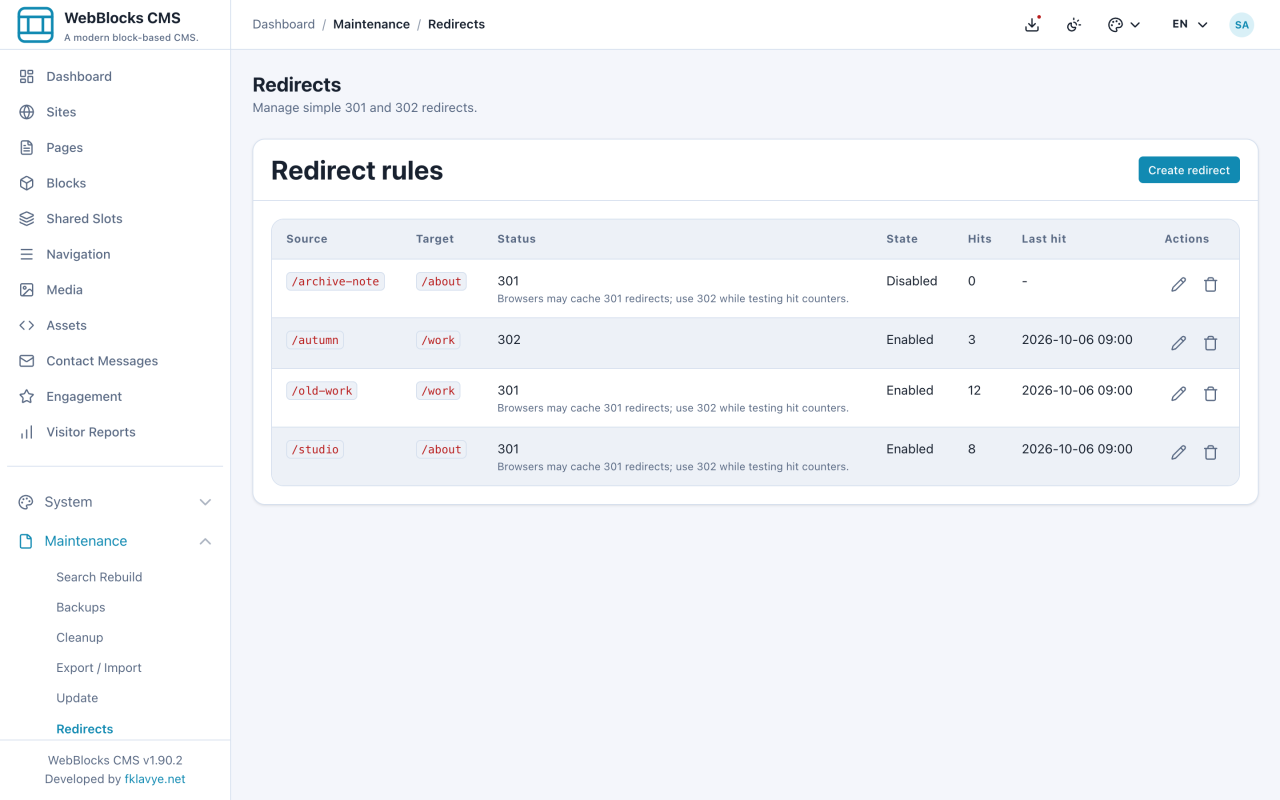
Redirect rules with enabled and disabled examples.
Showcase reference: WebBlocks CMS 1.90.2 · English interface · synthetic Northstar Studio data.